
Choose a poker app
Which poker app fits the game you actually want?
A quiet Hold'em game with friends, a particular private club and a quick public table are different jobs. Start with yours. Then check the devices, joining steps and controls that could make or break the evening—not the longest feature list.
Sources
The editorial record
Sources
The linked app guides identify the official sources behind the product descriptions and joining steps. Check the date and scope before relying on a feature, restriction or table listing that can change. The examples here are not a new round of hands-on app tests.
On September 19, DPH read Poker Now’s public homepage and linked tutorial, plan comparison and dated spectator instructions, plus Pokerrrr 2’s homepage and identity-matched App Store description/version notes. These readings support the named features and limits above; DPH did not create a room, install an app, test a player account, download a hand history or measure one-handed usability.
On October 11, DPH read the Pokerrrr 2 hosting FAQ and current Poker Now plan comparison for the host-charge and media-limit examples. Those source reads do not establish a tested purchase, hosted room or account outcome.
Sources and evidence
- Poker Now: home-game features and linked tutorial, plan and spectator documentation
- Source
- Official site
- Evidence
- First-party claim
- Accessed
- Sep 19, 2026
- Reviewed
- Review date not recorded
- Pokerrrr 2: home-game features and identity-matched display-control notes
- Source
- Official site
- Evidence
- First-party claim
- Accessed
- Sep 19, 2026
- Reviewed
- Review date not recorded
- Zynga Poker — Apple US listing
- Publisher
- Zynga Inc.
- Source
- App store listing
- Evidence
- First-party claim
- Accessed
- Oct 11, 2026
- Reviewed
- Oct 11, 2026
- Zynga Poker — official Windows Steam listing
- Publisher
- Zynga Inc. via Steam
- Source
- App store listing
- Evidence
- First-party claim
- Accessed
- Oct 11, 2026
- Reviewed
- Oct 11, 2026
- Zynga Poker — Steam platform support
- Publisher
- Zynga
- Source
- Developer documentation
- Evidence
- First-party claim
- Accessed
- Oct 11, 2026
- Reviewed
- Oct 11, 2026
- Pokerrrr 2 FAQ — hosted games and gold charges
- Publisher
- Pokerrrr 2
- Source
- Developer documentation
- Evidence
- First-party claim
- Accessed
- Oct 11, 2026
- Reviewed
- Oct 11, 2026
- Poker Now plan comparison — hosting and media limits
- Publisher
- Poker Now
- Source
- Official site
- Evidence
- First-party claim
- Accessed
- Oct 11, 2026
- Reviewed
- Oct 11, 2026
- Daily Poker Hub comparison controls — observed interface, October 11, 2026
- Publisher
- Daily Poker Hub
- Source
- DailyPokerHub test
- Evidence
- Editorial assessment
- Accessed
- Oct 11, 2026
- Reviewed
- Review date not recorded
 WhatsApp
 Facebook
 X
X1. Finish this sentence: I want to…
Name the game you are trying to reach. “Play with the same friends on Friday” needs a different answer from “Join the club my friend recommended.” A famous app name is not yet a reason to choose it.
- Join a particular club using the Club ID or instructions someone sent me.
- Host friends and choose our own game and room settings.
- Send a browser link without asking everyone to install another app.
- Find public social tables or tournaments without searching for a private club.
2. Compare the right kind of game
A club app separates the software from the club you join. A hosted room starts with a host and a code or link. A browser game opens on a website. Public social play does not necessarily start with an independent club at all.
One product can offer several of these options. Use the examples below to narrow the search, then read the relevant app guide. They describe published features, not a claim that DPH played every game or tested your setup.
- Already have a PokerBROS Club ID? Check the particular club and its membership process. That club's games are separate from the app's global Gold Lobby; installing the app does not settle which one you meant to use.
- ClubGG describes creating or joining clubs after installing the app and creating a free account. A club administrator can arrange ring games or tournaments. Check your group's actual club; an app account and acceptance into that club are different things.
- Suprema publishes Windows and mobile downloads alongside club and league tools. Looking to play rather than manage a club? Use the player instructions for the exact club. We have not confirmed one joining process that applies to every role.
- For a one-off browser game, Poker Now's quick-game instructions let a host create a room and share a link without an account or download. Its Clubs and Plus options have separate requirements; a quick room is not the same product decision as a recurring club.
- Pokerrrr 2 offers hosted games in an installed app. The host chooses settings and shares a game code. It also has public tables and club options, so check whether your friend sent a private-game code or information for a club.
- Zynga Poker offers public social tables without finding an independent agent or club. Its mobile and Windows Steam listings include Hold’em and four-card pot-limit Omaha. Windows users can use the released Steam app; Zynga’s Steam help does not support a native Mac version. Poker play uses virtual chips with optional purchases, not cash winnings. That differs from entering a private club.
3. Will it work on everyone's device?
Check the actual devices: the host's Windows laptop, a friend's iPhone and the older tablet someone plans to use. A browser option, mobile app and desktop installer are not interchangeable downloads.
Use the official website and matching store or installer. An emulator, wrapper or mirror listing does not establish official support. Check the product's own device requirements rather than giving it a tick for every platform mentioned in search results.
Find the current official product website.
Match its store, browser, APK or desktop link to the same publisher and product.
Check the supported device and operating-system version where published.
Keep missing, old, unavailable or conflicting information explicit; do not turn it into confirmed support.
4. What happens between opening it and taking a seat?
A browser quick game, public social account, hosted room and private club can have different entry steps. Do not compare them as though every download ends at a ready-to-play table.
Find out who needs an account, whether a guest option exists, what the host sends and whether a club must approve a request. For a specific extra feature, check which account or role needs it rather than assuming the whole group has the same requirement.
Read the documented joining steps before inviting everyone. DPH's app guides separate official instructions from any steps actually tested firsthand.
Check the cost of the task itself. Pokerrrr 2’s FAQ charges gold per hour for non-tournament hosting and per game for tournaments, with the tournament amount depending on settings. Poker Now Basic lists unlimited hosted games, but voice/video is limited to 30 minutes per day; Plus and Platinum list unlimited voice/video. A free download or room link does not make every requested feature free.
- Poker Now plan comparison. Published Poker Now plan limits, read October 11, 2026.
- Pokerrrr 2 FAQ. Published host charges and plan limits, read October 11, 2026.
5. Do the settings fit the game your group wants?
“It has poker” is not enough. You may want ordinary Hold'em blinds, longer turns for a social night, an Omaha variant or a tournament rather than a table you can leave between hands. Check that exact game and its controls.
- Which exact poker variants does the intended room or club offer?
- Is the game a ring table, a sit-and-go or a multi-table tournament?
- Can the host adjust the rules and settings your group cares about?
- Does everyone use the same room link, game code, Club ID or invitation?
- Do current sources support the specific history, HUD, timer, pause, spectator or chat feature you need?
6. Does running tonight mean scheduled or already active?
A published schedule tells you when a game is planned. A live-table observation tells you what was listed at one moment. Check which statement you are reading.
Compare information for the exact game or club. Keep private room details, player names, account information and balances out of anything you share publicly.
7. Will that contact get you to the club you meant?
Match the Club ID, invitation or contact to the correct app and club before comparing the experience it promises. A number on a list is not proof that its sender represents the club.
Check an agent's current identity and role. An old association or testimonial does not establish that the same person still represents the same club.
When a directory supplies the information, check whom it credits and when. Ask the relevant club or host about a mismatch; do not quietly choose whichever listing makes joining sound easiest.
8. What does the anti-cheating claim actually cover?
Apps may publish rules, monitoring claims, identity checks, reporting tools or certificates. Compare the specific control and what its source says it covers.
A rule against bots is not proof that every table is bot-free. Check the product, date and scope; a report about one club is not automatically a finding about the whole app.
Keep third-party reports attributed. DPH does not collapse different evidence into one universal safety or trust score.
9. Does the feature have separate participation rules?
Check the current requirements for the product, feature and location you intend to use. A download button or reachable website does not answer every participation question.
A store content rating and an operator's account rules are different. If official sources disagree, keep the conflict clear instead of awarding the app a favorable comparison result.
- Confirmed: the relevant evidence supports the detail.
- Not confirmed: the information does not settle the question.
- Not available: this is different from simply not knowing.
- Needs a fresh check: an older answer may no longer apply.
- Conflicting information: the sources disagree.
10. Who helps when something goes wrong?
Find the official support, appeal, moderation or account-deletion instructions before you need them. Separate an app-account problem from a question about a particular club or room.
A clear support address is useful. It does not promise a response time, account restoration or a particular dispute outcome. A restriction alone does not establish wrongdoing.
Use the proper private support channel for an individual account case. Do not turn private messages and player complaints into a public comparison score.
11. Is that detail known, or just confidently worded?
Open the app guide's sources and limitations. Check dates on details that change. Send a correction when the page and current source do not agree.
A supported app feature, a club-specific game and a live observation are different facts. Unknown information should stay unknown, not become a tick, a cross or a reason to call one app safer.
What the source labels mean
I am learning for a friends’ poker night. Where can I start?
Poker Now publishes an interactive No Limit Hold’em tutorial covering hand rankings, the board, betting rounds and a complete example hand. On its homepage, choose Poker Tutorial. That is a concrete starting point for learning the sequence; it is not a claim that DPH completed the tutorial or tested a solo practice mode in every app.
Then rehearse the group’s chosen variant with a friend in a play-money room. Ask the host for a slow clock and pauses between hands. Learn where fold, check, call and raise are before using a fast public table. Keep the glossary nearby, and agree to stop and explain an unfamiliar action. Practice does not promise wins or make a different game’s card-use rules apply.
We want time to talk. Which controls should we compare?
Poker Now’s published settings include an adjustable action limit, a no-limit option and pauses between hands. Pokerrrr 2’s homepage describes adjustable game speed and duration. DPH has not confirmed the current maximum decision time for every Pokerrrr 2 game, so ask the host to check the actual room setting rather than copying another app’s number.
Poker Now offers built-in voice/video, but its plan table separately limits Basic voice/video to 30 minutes per day and lists unlimited use for Plus. A room link is not evidence that every guest has unlimited media. Pokerrrr 2 documents private chat; that is not confirmation of an equivalent voice/video allowance. Check who needs the feature and the applicable account or host rule before inviting the group.
I know poker. Why do I need a club, code or agent?
For a club-based game, the short route is: the correct app account → the chosen club’s membership request → approval where required → that club’s game. A public Club ID identifies the club; it is not your player ID, password or a seat reservation.
For a hosted room, start with the host’s room link or game code instead. A union is a separate network or administrative relationship, and an agent is a separate contact role; neither is automatically an extra account that every player must create. Ask only for the role or identifier required by the game you chose. The app/club/union/agent guide below explains the distinctions.
We want ordinary Hold’em, not missions and animated rewards.
Choose the private-room route and ask the host for ordinary Hold’em settings, rather than entering a public mission or event because it is prominent in the lobby. Check whether optional side games are enabled. Private play does not automatically remove every promotional feature.
Pokerrrr 2’s App Store notes for version 7.7.6 describe settings to hide Firearms animations and in-game messages. That is a specific display control, not proof that every mission, reward or animation can be disabled. Poker Now’s plan comparison also distinguishes hiding promotional content for an account from hosting games without promotional content. Check the relevant option and role instead of assuming a plain table is ad-free.
One friend will not install an app. What works?
Poker Now’s quick-room instructions use a browser link and do not require a player signup. Its separate Clubs and tournament products should not be treated as the same guest flow. Pokerrrr 2’s private-game route uses its installed app and a game code; it does not solve a no-install requirement by itself.
Have the host send the intended room link, not a club-management page. Check that each person can open it on their actual device and establish any seat-approval step with the host. A browser guest is not evidence of a permanent account, synchronized history, unlimited media or access to every additional feature. Keep the room link private.
I want to study hands later, not get advice during play.
Poker Now lists a downloadable session log and hand replay. Its plan page describes an unlimited hand-history archive and an enhanced replay tool separately. Pokerrrr 2 documents in-app hand histories and sharing; the pages checked here do not establish a bulk export format for your account.
Before choosing, check whether the record you need can be viewed, downloaded or kept after the session, and which account can access it. A replay, a screenshot, a session ledger and an export are different outputs. Read the ClubGG details guide for PokerCraft and the PokerBROS details guide for that product’s published tool rules.
Review your own permitted records after play. Access to a history does not authorize a live decision assistant, an external HUD, automated play or collecting other players’ private data. Check the exact product’s current rules before connecting a tool, and remove private room links and unrelated account details before sharing a hand.
Which app is easiest with one hand on a small screen?
DPH has not performed a side-by-side one-handed device test of these poker apps, so there is no supported usability winner here. Pokerrrr 2’s published gesture controls describe an interaction style, not measured target size, reachability or error rates on your phone.
Use your actual device and usual text size for a no-stakes check: reach fold/check/call without moving your grip, enter and confirm a bet, open the menu, dismiss it, and find the sit-out or leave control. Note cramped targets, accidental gestures, hidden labels and controls blocked by the keyboard. A screenshot or a large feature count cannot answer those checks, and DPH’s own responsive-site tests do not test another app’s controls.
Can we play only with the people we invited?
Use the intended private room or club, not the public lounge. Poker Now documents room links and separate club membership controls; Pokerrrr 2 describes private games entered by code as distinct from public tables. Treat a link or code as shareable access information, not proof of who is using it.
Ask the host who can enter, who can take a seat, who can watch, and how an unwanted visitor is removed. Keep invitations within the group and verify the names before starting. Poker Now’s dated spectator instructions describe an optional mode exposing seated players’ cards to authorized spectators, with player agreement. Do not enable it casually for an ordinary private game or assume “unseated” always means unable to see cards.
Will a different app resolve an argument with my club admin?
Not by itself. Changing software and changing the responsible club operator are separate decisions. If the same organizer runs both clubs, moving to their other app does not establish a new relationship or resolve the original disagreement.
Identify whether the issue concerns the app account, a club decision or an error on DPH. Keep the relevant messages and dates private, and contact the party responsible for that issue. DPH can correct its own description, but a comparison result is not an appeal decision, refund promise or confirmation that membership and funds transfer. Do not share login credentials to demonstrate your case.
Use your actual game as the comparison
Scroll the table horizontally to see all columns when space is limited.
| Your question | What to check | When it is unclear |
|---|---|---|
| Can it do the kind of poker night we want? | The product needs to support the particular club, hosted room or public social game you want. | Read that mode's explanation in the app guide before comparing extras. |
| Is this the official app or a lookalike? | Match the website, store listing and publisher. | Use the official-download guide rather than a file sent in chat. |
| Will my friend's older phone work too? | Compare every needed device and operating system, not just the host's laptop. | Check the exact official listing or browser requirements. |
| Can we join now, or do we need accounts and approval? | Find the account, host, invitation and club-approval requirements. | Use the documented steps for the exact club or room; do not assume approval is instant. |
| Does hosting or our chosen feature require gold or a paid plan? | Separate free installation and basic play from the published host charge, plan limits and optional items. | Check the charge and conditions for the exact game settings before inviting the group. |
| We want this Omaha variant. Does that room actually offer it? | Match the exact variant and controls to the room or club, not just the app-wide list. | Check the intended game's current information. |
| My friend sent a number. Which field does it belong in? | Confirm whether it is a room link, private-game code, Club ID or invitation. | Use the ID/contact guide to resolve a different app, club name or contact role. |
| Are people playing now, or is that last night's listing? | Look at the specific game and its observation time. A published schedule is different. | Keep activity unknown when no current observation supports it. |
| I can download it. Can I use the feature I want? | Read the feature's actual location, account and participation requirements. | Do not infer permission from the fact that a website opens. |
| Does that anti-bot claim prove every table is clean? | Find the source, scope and date of the particular rule or report. | Use the safety guide to distinguish a published control from a verified outcome. |
| Who can help with a login problem rather than a club request? | Find the official app support contact and the separate contact for club questions. | Keep account details private and use the person responsible for that problem. |
| Is this still true, or did the page just get a new date? | Read the check date for the feature, account step or game listing you rely on. | Return to the current source when the older detail matters to your choice. |
A good shortlist fits your game and devices. Resolve the requirement that could stop your group using an option; do not quietly turn an unknown into confirmed support.
Use the Compare tool below for side-by-side app information. This checklist is a reading aid, not a form that collects or submits your answers.
Use Compare to resolve the choice that matters
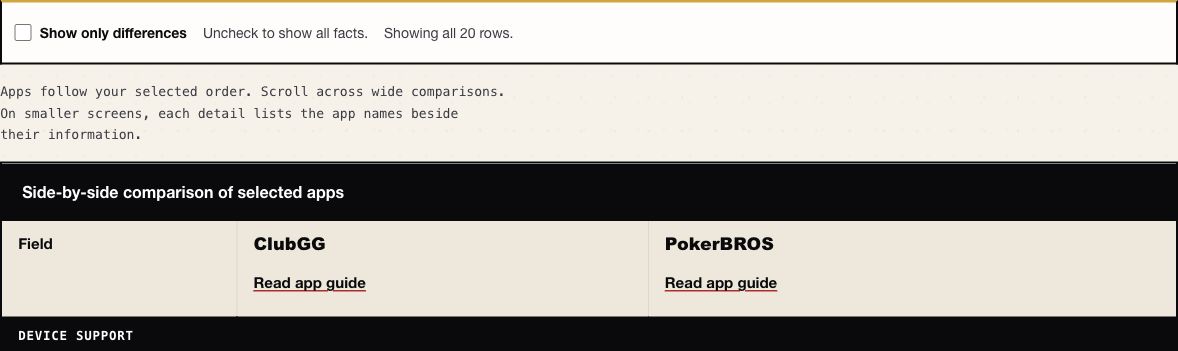
Search by app name or alternate name and select the apps you are considering. Add another app until at least two are selected. For a Windows game with a ClubGG or PokerBROS invitation, start with those two apps and read Device support beside How you play: device access and reaching the invited group are separate requirements.
Turn off Show only differences when you need to see a requirement even if both apps have the same entry. Turn it on to hide matching rows and focus on what separates the selection. A hidden row means the displayed information matches; it does not mean that DPH tested the feature. Read What supports this detail and Last verified before relying on a published claim. Use Read app guide for the joining or download steps behind the table.
Put the apps in the order you want your group to read them, then choose Copy link to these apps. The link carries the selected apps and their order. It starts with differences shown and does not record your toggle setting, chosen rows or personal notes. Send the row names that matter to your decision, such as Device support for a Windows game. The link opens current public records, not a frozen snapshot. If an app is unavailable, the tool reports it and lets you choose another.
What this comparison does not settle
This guide compares game access, devices, controls and published feature limits. It does not rank apps by winnings, payment arrangements or financial safety, and it does not promote cash-prize campaigns. Optional software purchases are identified only where they affect the task.
Player complaints are not turned into a public trust score. Paid placement elsewhere on DPH can affect disclosed prominence, not the facts shown for an app or the meaning of unknown information.
Guides & glossary
Build your poker-app know-how.
Get new guides, useful explanations and glossary additions when we publish them.