
The app guide
Poker Now: create a game and invite friends
Poker Now lets a host create a private browser room and invite friends with a link. Start with a nickname, then take a seat and approve your guests. No app download is required for a quick game; Clubs, subscriptions and switching devices have separate requirements.
Sources
The editorial record
Sources
Sources and evidence
- Poker Now official site
- Source
- Official site
- Evidence
- First-party claim · Editorial assessment
- Accessed
- Sep 10, 2026
- Reviewed
- Sep 1, 2026 · Sep 7, 2026 · Oct 10, 2026
- Poker Now Terms of Service
- Source
- Legal or policy source
- Evidence
- First-party claim · Editorial assessment
- Accessed
- Sep 6, 2026
- Reviewed
- Sep 1, 2026
- Poker Now Privacy Policy
- Source
- Legal or policy source
- Evidence
- First-party claim · Editorial assessment
- Accessed
- Sep 6, 2026
- Reviewed
- Sep 1, 2026
- Poker Now Clubs
- Source
- Official site
- Evidence
- First-party claim · Editorial assessment
- Accessed
- Sep 6, 2026
- Reviewed
- Sep 1, 2026
- Poker Now community
- Source
- Official site
- Evidence
- First-party claim · Editorial assessment
- Accessed
- Sep 6, 2026
- Reviewed
- Sep 1, 2026
- Poker Now privacy policy — IP use, game records and deletion requests
- Publisher
- Poker Now
- Source
- Legal or policy source
- Evidence
- First-party claim
- Accessed
- Oct 11, 2026
- Reviewed
- Oct 11, 2026
- Poker Now: Club Tournaments (October 2, 2026)
- Publisher
- Poker Now
- Source
- Developer documentation
- Evidence
- First-party claim
- Accessed
- Oct 10, 2026
- Reviewed
- Oct 10, 2026
- Poker Now: using the same player across devices
- Source
- Developer documentation
- Evidence
- First-party claim
- Accessed
- Sep 16, 2026
- Reviewed
- Review date not recorded
- Poker Now feedback: video and voice warning preference
- Source
- Forum
- Evidence
- User report
- Accessed
- Sep 16, 2026
- Reviewed
- Review date not recorded
- Poker Now plans: Basic, Plus and Platinum
- Source
- Official site
- Evidence
- First-party claim
- Accessed
- Oct 10, 2026
- Reviewed
- Oct 10, 2026
- Poker Now spectator-mode instructions, January 18, 2021
- Source
- Developer documentation
- Evidence
- First-party claim
- Accessed
- Sep 16, 2026
- Reviewed
- Review date not recorded
- Poker Now feedback: requests versus released features
- Source
- Official site
- Evidence
- User report
- Accessed
- Sep 16, 2026
- Reviewed
- Review date not recorded
- Poker Now feedback: late-arriving cash-game seats
- Source
- Official site
- Evidence
- User report
- Accessed
- Sep 20, 2026
- Reviewed
- Review date not recorded
- Poker Now feedback: automatic hand reveal
- Source
- Official site
- Evidence
- User report
- Accessed
- Sep 20, 2026
- Reviewed
- Review date not recorded
- Poker Now feedback: advance Run It Twice preferences
- Source
- Official site
- Evidence
- User report
- Accessed
- Sep 20, 2026
- Reviewed
- Review date not recorded
- Poker Now feedback: automatic top-ups
- Source
- Official site
- Evidence
- User report
- Accessed
- Sep 20, 2026
- Reviewed
- Review date not recorded
- Poker Now feedback: paid theme application report
- Source
- Official site
- Evidence
- User report
- Accessed
- Sep 20, 2026
- Reviewed
- Review date not recorded
- Poker Now feedback: paid history loading report
- Source
- Official site
- Evidence
- User report
- Accessed
- Sep 20, 2026
- Reviewed
- Review date not recorded
- Poker Now feedback: large-pot replay filter
- Source
- Official site
- Evidence
- User report
- Accessed
- Sep 20, 2026
- Reviewed
- Review date not recorded
- Poker Now: New Game nickname form
- Publisher
- Poker Now
- Source
- Official site
- Evidence
- First-party claim
- Accessed
- Oct 9, 2026
- Reviewed
- Oct 9, 2026
- Poker Now: No Download Poker with Friends Tutorial (January 14, 2021)
- Publisher
- Poker Now
- Source
- Developer documentation
- Evidence
- First-party claim
- Accessed
- Oct 9, 2026
- Reviewed
- Oct 9, 2026
- Poker Now: Update January 11, 2021
- Publisher
- Poker Now
- Source
- Developer documentation
- Evidence
- First-party claim
- Accessed
- Oct 10, 2026
- Reviewed
- Oct 10, 2026
- Poker Now — public entry walkthrough, October 13, 2026
- Publisher
- Daily Poker Hub
- Source
- DailyPokerHub test
- Evidence
- Independent observation
- Accessed
- Oct 13, 2026
- Reviewed
- Oct 13, 2026
Change history
Poker Now / Editorial record
Change history
- Latest update
Fairness/privacy source scope clarified
Explained the dated privacy policy’s IP/collusion purposes, retained game data and ownership-checked deletion requests. No current collection, security or collusion-detection test.
 WhatsApp
 Facebook
 X
XWhat makes Poker Now unique?
Poker Now uses a shared browser link for a private table. Friends can open it on a phone, tablet or computer without installing a native poker app.
The quick-game route suits a group that already has a host and invited players. It does not require everyone to create an account just to get started.
Choose a quick room when you need a table for one session. Consider Clubs when your regular group needs persistent membership and past sessions. Those are different access and record-keeping choices, even though both use Poker Now.
Room capacity and subscription benefits are separate decisions. The documented room capacity is ten players. The plan comparison lists 30 minutes of video and voice per day for Basic; Plus and Platinum list unlimited use. Check which allowance applies to your group before relying on an evening of built-in chat.
How do you join Poker Now?
A quick-game host can create a room without signup. A Club membership identifies a recurring group; it is not a replacement for the invitation link to a particular room.
If you plan to move from a laptop to a phone during play, sign in with the same Poker Now account on both devices. A guest identity belongs to its browser session. The device-switch instructions are in the linked account-help page.
Open the official Poker Now site and choose Start a New Game, or New Quick Game in the navigation. Both open the New Game form. Enter Your Nickname, then choose Create Game. The first screen asks for a nickname, not blinds or starting stacks.
At the table, enter your starting stack and choose Take the Seat, following Poker Now’s published tutorial. Agree on the game and blinds with your group before play.
Copy the private room link and send it to the friends you are inviting. Each friend opens the link and requests a seat; receiving a link does not itself approve a seat.
As host, open Options and approve the invited players in the player list. When the group is seated and ready, choose Start Game.
We rechecked the homepage’s New Quick Game route and the public nickname form on October 13, 2026; the screenshot is in the walkthrough below. The table, invitation and approval steps above come from Poker Now’s January 14, 2021 tutorial. We did not submit the form, create a room or test those later steps. Use the current room controls if their labels differ.
Check the domain and confirm that the link came from the host you meant to join. A room link can be private, expire or reach people it was not intended for.
Do not publish a private room link as a general public route. Do not send a host or player your password, recovery details, identity documents, account access, or control of your device.
We have not confirmed an official public player lookup by ID. To reconnect with someone from your private game, ask the host or use your existing contact with that player.
Poker Now’s August 7, 2026 guide explains that a guest identity belongs to a browser session. Signing in with the same account keeps your own player identity across devices. Those instructions explain returning to your own seat; they do not establish a way to find another player from an ID.
What games does Poker Now offer?
Current official pages describe No-Limit Hold’em, Pot-Limit Omaha, Omaha Hi/Lo, and additional room options.
Ask the host which variant and settings are in use. An option listed for Poker Now is not automatically enabled in your room, and quick games, Clubs and Plus can offer different controls.
Tournaments are a separate mode. The October 2, 2026 Club Tournaments article describes a beta feature with plan and host-setting requirements; it does not make tournaments part of every free quick room. Use the linked tournament entry and rebuy answers for that club mode.
How does Poker Now separate the app from the game?
Poker Now describes its software as play-money poker: its chips have no monetary value, and it does not offer real-money prizes. This describes the software, not any separate arrangement proposed by a room host.
Are there reports of cheating, and is Poker Now rigged?
Poker Now’s privacy policy says it stores IP addresses to help prevent hacking and, in some cases, collusion. It also describes an identification cookie, records of games you participate in, and identifiers from social sign-in. The page’s stated update date is October 14, 2020; DPH read it on October 11, 2026.
The policy gives no fixed data-retention period: the operator keeps data as it considers necessary. You can request removal, or anonymization where removal is not possible, through the support address in the policy. The request requires a way to identify you as the data owner, such as the relevant cookie or social account.
This describes the operator’s published data use. It does not establish that every private room is free from collusion or show exactly how today’s detection works. DPH did not test data collection, deletion or security controls.
- Poker Now privacy policy. Published IP/data purposes and removal process; policy dated October 14, 2020.
These sources do not support a blanket verdict that every game is fair or rigged. DPH has not independently tested gameplay; a cheating report and proof of manipulated card dealing are separate matters.
App games
Poker Now groups and tables
WhatsAppFacebookXApp observations load when this panel opens.
0 entries · captured observations, not available seats
| App | Name | Game | Stakes | Min. buy-in | Players | Games |
|---|
No entries match your filters.
App essentials
At a glance
The essentials before you play.
- Devices
- Web browser at PokerNow.com
- Games
- No-Limit Hold’em, Pot-Limit Omaha, Omaha Hi/Lo, and additional room options.
Publisher, eligibility & other details
- How you play
- Browser-hosted private poker game
- Operator
- Rio Gaming, Inc.
- Native app
- No native iOS, Android, Windows, or macOS app is required for the normal browser product.
- How to join
- A host creates a room and shares its link.
- Quick-game account
- The current homepage states that a quick game can be created without signup.
- Clubs and Plus
- Clubs and Poker Now Plus have separate account, membership and feature requirements from quick games.
- Eligibility
- The current terms require the age of majority or legal age in the user’s jurisdiction.
Reviewed
Open in your browser
Open the official site to play in your browser.
What the Poker Now New Game form asks for
The public New Game form starts with a nickname. It does not ask you to choose blinds or starting stacks on this first screen.
Open PokerNow.com and choose New Quick Game. It opens the New Game form shown below.
Read the terms and privacy notice linked on the page. If you decide to host, enter the name you want players to see in Your Nickname.
Create Game is the next control. Our public-screen check stops before submitting it; the later table and seating steps in How to join are attributed to Poker Now’s published tutorial.
Joining a friend’s game instead? Use that host’s room link. Starting a new quick game is a different task from entering the room your friend already created.
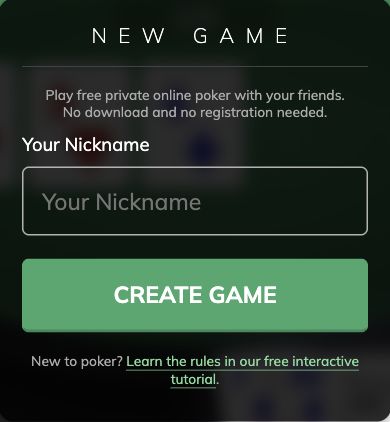
- Public screen checked October 13, 2026: Poker Now entry source. We opened the form from the homepage. We did not enter a nickname, submit the form, accept an agreement control or test a room.
Open the official Poker Now site
The current official product route is PokerNow.com. The current terms and privacy pages are published through Poker Now’s network site and identify Rio Gaming, Inc. as the operator.
Start with PokerNow.com, then use the link from the host you meant to join. A search ad, lookalike site or unrelated app-store listing is not a substitute for the official product.
App tools & formats
From the felt
Guides for your next game
Browser poker versus native apps
Browser or installed poker app
Organizing poker with friends? Compare browser rooms and installed apps by device support, accounts, room links and the host controls your group needs.
Browse all poker apps
Poker app directory
Compare poker apps for club games, private games with friends and public social tables. Filter by device and play style, then find the official download.
How to compare poker apps
Choose a poker app
Compare poker apps for friends, private clubs or public tables. Check device support, joining steps, host controls and current game information.
Verify poker club IDs and contacts
Check a poker Club ID
Check a poker Club ID or contact before using it. Resolve different IDs on two websites, a wrong-app match or an old invitation without guessing.
Poker app safety and fairness
Poker app safety and fairness
Concerned about bots, a club contact or an account restriction? Check the specific source and incident without mistaking a rule, report or app error for proof.
Poker app glossary
Poker app glossary
Look up poker Club IDs, referrers, chips, Diamonds, stake units, hosts and unions. Get plain answers and links to the relevant product rules.
App coverage
Keep up with the apps.
New app profiles, reviewed changes and additions to our comparison coverage, sent to your inbox.