
Check a poker Club ID
Someone sent you a Club ID. Is it the right one?
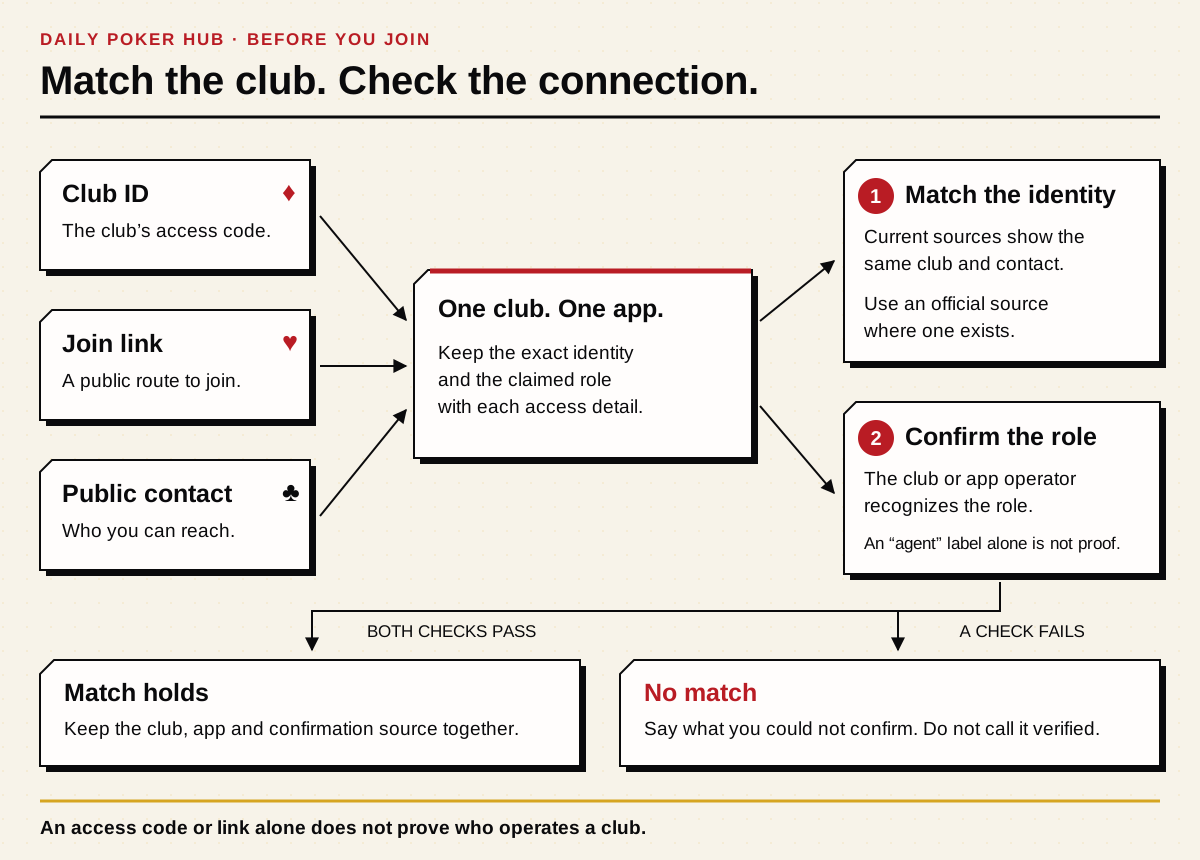
Match the app, the club name and the number against a current public source. Then check who sent it. A matching Club ID helps you find a club; it does not prove that the sender owns it or can approve your request.
Sources
The editorial record
Sources
The linked app guides point to official product sources. For a club, use its current public information and check what each source actually says about the ID and contact. A directory entry or reply does not establish facts beyond its stated scope.
Sources and evidence
- NUTS: public PPPoker club ID, joining and advertised games
- Publisher
- NUTS
- Source
- Club or union site
- Evidence
- First-party claim
- Accessed
- Oct 11, 2026
- Reviewed
- Review date not recorded
 WhatsApp
 Facebook
 X
XRight number, wrong app? Start here.
Check four things separately: the app, the club, the number or link, and the contact. One familiar name does not confirm the rest. A code for another product is not a shortcut into the club you meant to join.
App: which software should you open?
Club: which named group are you trying to find?
Number or link: is it a Club ID, a room code or an invitation?
Contact: which club or business does the person represent?
1. Check which app the club uses
Open the relevant DPH app guide and find the official website, store listing or browser option.
Match the app name and publisher to the official source.
Check that the club's current public information names that same app.
If the app names differ, resolve that mismatch before trying the number.
2. Same club name does not always mean the same club
Match the public club name and any documented former name to the correct app. Two clubs can use similar names, and the app developer is not automatically the club operator.
A club and an operator may share a brand. Check what their own public information says about who runs the club instead of assuming the name settles it.
A copied logo, familiar description or shared contact is not enough to merge two listings. In particular, keep clubs on different apps separate unless a source establishes the relationship.
3. Check the number or link you were given
Confirm which app accepts the number or link.
Compare it with the value shown for that exact club in a current public source.
Check the source date and whether the value is still described as current.
Look for a conflicting value or the same number attached to another club.
Check whether it is public or intended for one person, room or invitation.
Keep private room links, passwords, tokens and personal invitations out of public club listings.
4. Can this contact help with your actual question?
A public Telegram, WhatsApp, Discord or email contact should clearly identify the club, operator, agent, network or support role it serves.
A logo does not make the account the club owner, app developer or union manager. Compare the contact with a current source that describes its role.
Waiting for club approval and unable to sign in to the app are different problems. The club contact and the app's support team may have different responsibilities even when their pages use the same branding.
- Club contact: represents the named club.
- Club operator or administrator: responsible for the role the source identifies.
- Agent: represents a particular club or network, not automatically the app.
- App support: handles the product questions described by the official support source.
- Union or network contact: represents that network, not necessarily every club in it.
- Role not confirmed: do not fill in the missing role from a name or logo.
Follow the matching checks
Two websites show different IDs. Which one should you use?
Do not choose the first result just because it looks newer. Check the exact app and club on both pages, then find the source each page credits. A recently updated directory may still repeat an old number.
Separate the club's own published information from a directory's report. A directory can be useful without being the club or speaking for it.
Ask the club's current public contact to explain the exact mismatch when the published sources do not resolve it. Compare the reply with the public source; the reply alone does not independently prove who the contact represents.
Keep private invitations private, and do not use an old directory entry to dismiss a conflict with the club's current information.
What should you actually ask?
Keep the question specific. Ask which app the club uses, whether its public Club ID or join method is current, what role the contact holds and where the same details are published. You do not need to send account credentials to ask.
Compare the answer with the app and club's public information. A reply is that contact's statement, not an independent reliability check.
Some club joining processes, such as NUTS’s published PPPoker instructions, ask for your own Player ID. Send that identifier privately to the club contact you matched; do not publish it. Keep passwords, one-time codes, recovery details, other players’ private information, private room links, payment details and identity documents out of that exchange. Do not grant account or device access.
Did the club submit or pay for the listing?
A self-submitted listing tells you who supplied the details. It does not replace checking the app, club, public ID and contact role.
Payment can affect a disclosed placement's position or prominence on DPH. It cannot make a wrong Club ID correct or turn an unchecked claim into a confirmed fact.
A private value stays private even when someone submits it to a directory.
Submitting information alone does not guarantee publication, a recommendation, priority or a response time. A paid arrangement is a separate matter and must be disclosed where it affects placement.
Pause when one of these things happens
The club and its supposed ID point to different apps.
The same Club ID or contact is attached to unresolved, different clubs.
The contact represents another business or cannot establish the claimed role.
The only support is an old post, copied list, forwarded message or search snippet.
A directory disagrees with the current source responsible for the detail.
Someone asks you to share a password, one-time code, recovery value, identity document, other players’ private information or control of your device.
A public ID has changed but no current source establishes its replacement.
A supposed public club link is actually a private invitation, room link or account token.
Ready to use the ID? Run through this list.
- The app name matches the official website or store listing.
- The club name and any documented aliases belong to the intended club in that app.
- A current public source assigns that ID or link to the club, with no unresolved conflicting match.
- You know which club or business the contact represents and in what role.
- You can tell whether the source is the club, its operator or a third-party report.
- No private invitation, room link, credential or account token is being presented as public.
- The check date is visible and the details still match the current source.
- Matching: the app, club, public value and contact role agree with the reviewed sources. This is an identity check, not a safety guarantee.
- Conflicting: current sources disagree. Resolve the mismatch before using the number or contact.
- Outdated: the details need another check before you rely on them.
- Private: the invitation or room details are not intended for public sharing.
- Wrong destination: the value belongs to a different app, club or role.
Guides & glossary
Build your poker-app know-how.
Get new guides, useful explanations and glossary additions when we publish them.