
Club-based poker apps
How club-based poker apps work
The app is the software. The club is the group you join inside it. Downloading the app does not put you in a club, and entering a Club ID is not the same as being accepted. Here is how to get from one step to the next.
Sources
The editorial record
Sources
The sources below support the app, club, joining and policy details in this guide. Read the source for the detail you are checking: a published claim, a third-party report and a recorded observation are different kinds of support.
Sources and evidence
- PokerBROS official product site
- Source
- Official site
- Evidence
- First-party claim
- Accessed
- Sep 6, 2026
- Reviewed
- Sep 1, 2026
- PokerBROS FAQ
- Source
- Developer documentation
- Evidence
- First-party claim
- Accessed
- Sep 11, 2026
- Reviewed
- Sep 1, 2026
- PokerBROS club creation guide
- Source
- Official site
- Evidence
- First-party claim
- Accessed
- Sep 6, 2026
- Reviewed
- Sep 1, 2026
- ClubGG home
- Source
- Official site
- Evidence
- First-party claim
- Accessed
- Sep 6, 2026
- Reviewed
- Sep 1, 2026
- ClubGG help center
- Source
- Developer documentation
- Evidence
- First-party claim
- Accessed
- Sep 6, 2026
- Reviewed
- Sep 1, 2026
- Suprema Poker official site
- Source
- Official site
- Evidence
- First-party claim
- Accessed
- Oct 10, 2026
- Reviewed
- Review date not recorded
- Suprema Poker general rules
- Source
- Legal or policy source
- Evidence
- First-party claim
- Accessed
- Oct 7, 2026
- Reviewed
- Review date not recorded
- NUTS: public PPPoker club ID, joining and advertised games
- Publisher
- NUTS
- Source
- Club or union site
- Evidence
- First-party claim
- Accessed
- Oct 11, 2026
- Reviewed
- Review date not recorded
 WhatsApp
 Facebook
 X
XFrom app to table
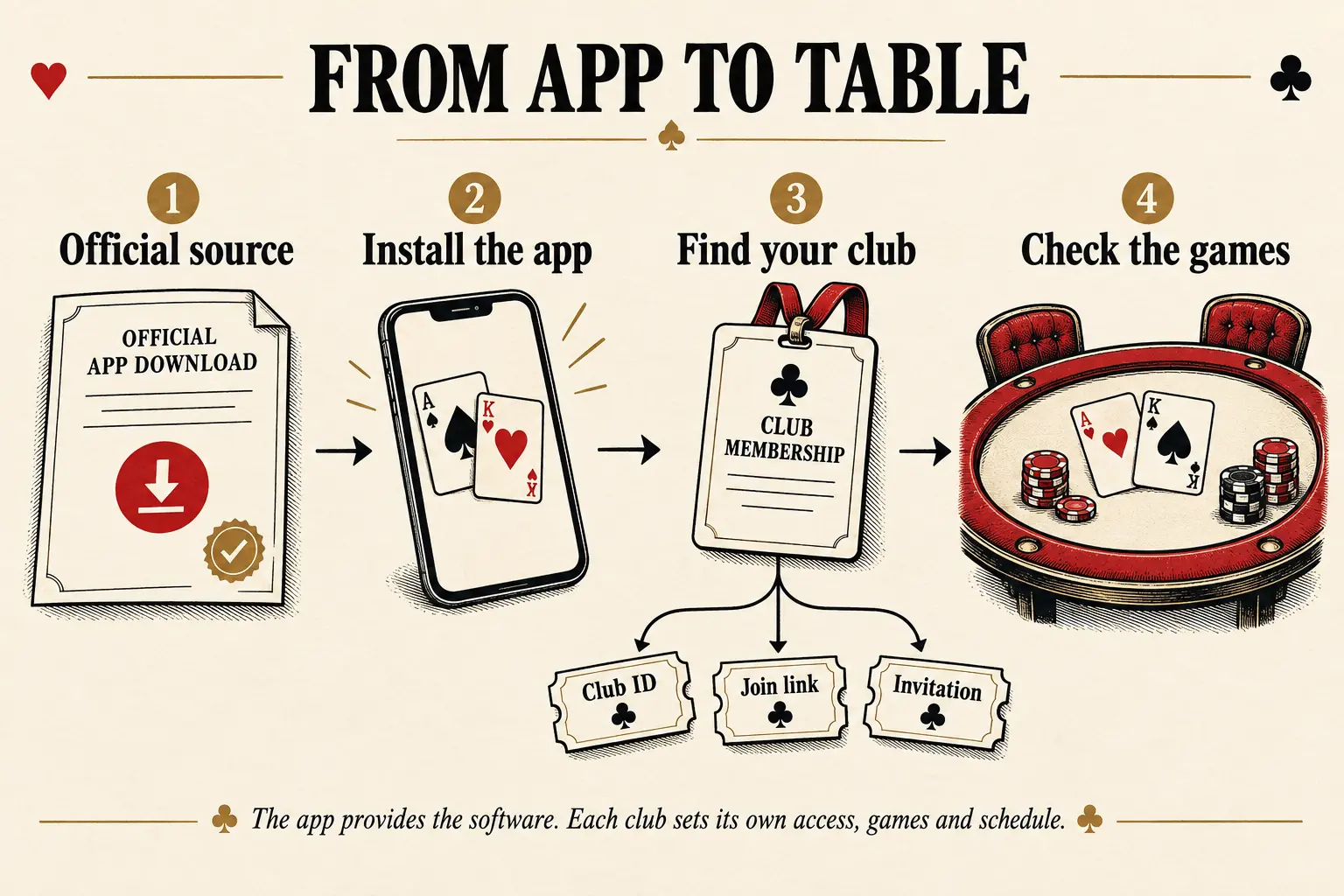
Start with the official app, sign in the way that product requires, and find the club you intended to join. Then check its games and joining requirements. The same app can contain clubs with very different schedules and rules.
Open the app's official website or store listing.
Check the app name and publisher before you download.
Create or open the account that the app requires.
Use the Club ID, invitation or joining link from a source you have checked.
Match the club name and app, send the request, and check that the club has accepted it before treating yourself as a member.
Check that club's games and schedule. Treat live table information as a separate check.
Guides & glossary
Build your poker-app know-how.
Get new guides, useful explanations and glossary additions when we publish them.
From app to club
What the app controls
The app operator supplies the software, accounts, supported devices, game formats and club or host tools. Its own website and help pages explain the app-wide rules.
Think of those features as the available tools, not a promise about every table. An app that supports Omaha can still have a club that runs only Hold'em.
- PokerBROS, ClubGG, and Suprema publish club-oriented product tools.
- Each club or network has its own joining details, schedule and current tables.
What the club controls
A club can have its own name, administrators, Club ID, joining process, games and table settings. It may also belong to a union or work with an agent.
Two clubs in the same app are not interchangeable. A busy table, helpful contact or published rule at one does not tell you what happens at the other.
Already know which club you want? Check that club's details rather than starting the whole app search again. If its game list or contact is not confirmed, that is the missing answer.
Got a Club ID? Check what it points to.
A Club ID helps the app find a club. An invitation or joining link may take you there another way. None of these alone proves who runs the club or whether someone messaging you represents it.
Match the number to the app, club name and source that published it. Check the date too. If two sites give different numbers for the same club, do not settle it by copying whichever one appears first.
Unions, networks and agents
A union or network can connect clubs or game pools. An agent acts as an intermediary. Neither label automatically means the person runs the app or owns every connected club.
Ask which app and club an agent represents. A messaging handle tells you where to send a message, not whether the person is reliable.
DPH separates a supported relationship from a claim about trust. A polished profile, testimonial or lack of complaints does not prove financial reliability.
I entered the ID. Why am I still waiting?
Finding the club is not the same as joining it. The app may require an account first, and the club may require an invitation or approval after you send a request.
Check whether you have found the club, submitted a request or been accepted. Those are different steps. Even acceptance does not mean every game or app feature is available to you.
If you can sign in, check the Club ID and the club's stated approval process before repeating the request. The club's identified administrator handles membership questions. Use the app's official help for a sign-in or account problem.
Will my game actually be running?
Want Omaha rather than Hold'em? Check the club's game list, not just the app's features. A supported format tells you what the software can do; a club schedule tells you what someone plans to run.
Check the schedule's date and timezone before planning your evening. No published schedule means the timing is unknown. It does not mean the club follows another club's hours.
A table check is not a reserved seat
Check which club and game a live-table note describes, its source and its UTC check time. It is a snapshot: the table may change before you open the app. A large member list is not a count of people at your table right now.
Reading live table information
What does an anti-cheating rule tell me?
Apps may publish rules or tools for account security, bots, collusion, identity checks and reporting a problem. Read the rule that applies to the app and game you mean.
A published rule tells you what is prohibited or what a control is meant to do. It does not prove that every club follows it perfectly or that no one at a table breaks it.
A report about one hand, club or event is evidence about that report, not an automatic verdict on the whole app.
Before you join
Check that you downloaded the official app.
Match the club name and Club ID or joining link to that app.
Check which club and role the public contact represents.
Look for the game you want in that club's current information.
Check the timezone on any published start time.
Check the source and time on any live-table claim.
Read the exact rule behind a restriction or fair-play claim.
Do not send a club contact your password, one-time code, recovery details or identity documents, or give them control of your device.
What this guide covers
This guide explains apps, clubs and the joining process. It is not a guide to depositing, buying chips, withdrawing or cashing out.
Knowing how to join does not tell you whether a club is financially reliable or what you might win. We do not promise either.